Structure in AI Communication
Understanding JSON Prompts vs. Natural Language
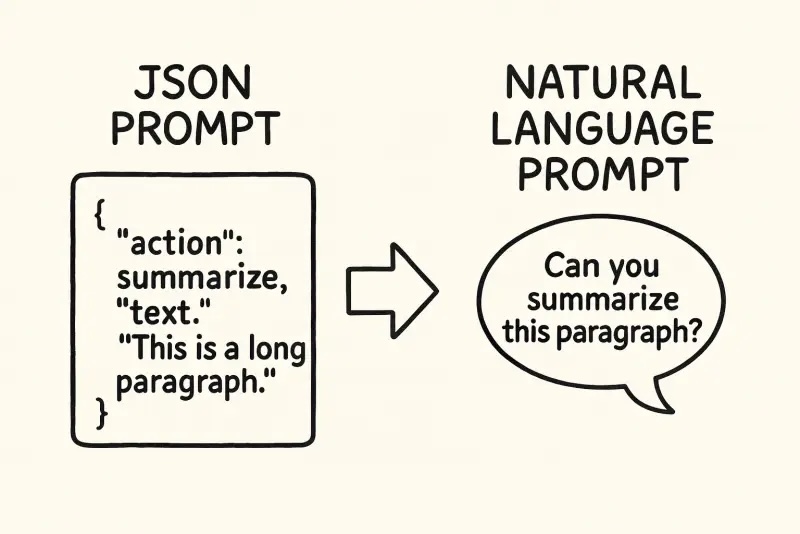
When communicating with AI, most of us begin with natural language because it feels intuitive and familiar. You might type, “Summarize this article,” or, “Suggest five ideas for a healthy lunch.” Natural language works well for simple requests because it mirrors the way humans speak to each other. But as tasks become more complex and require precision, structured formats like JSON prompts become increasingly valuable.
1) Starting Simple: How AI Understands Natural Language
Large Language Models (LLMs) are trained primarily on vast amounts of written human text. When you enter a natural language prompt, the AI doesn’t read it with logical rigor; rather, it tokenizes the text and uses patterns it has learned to predict a probable output.
For example, a prompt like:
Generate a JSON object with 3 fields: "title", "summary", and "tags".doesn’t cause the AI to parse and enforce a rigid structure. Instead, it recognizes patterns and statistical relationships from its training data that resemble your request. This approach is flexible, but it can also be ambiguous. Small changes in phrasing may lead to different results, or even errors.
2) Adding Explicit Structure with JSON Prompts
As your tasks with AI become more specific—perhaps involving multi-step instructions or well-defined outputs—JSON prompting steps in to provide clarity and consistency.
Consider this example:
{
  "task": "summarize",
  "input": "Text about renewable energy sources...",
  "output_format": {
    "title": "string",
    "summary": "paragraph",
    "tags": ["string"]
  }
}
With JSON prompts, every detail of your requirement is formalized. You’re no longer describing intent in words, but specifying it with fields and values. This makes the prompt much clearer—especially for humans reading, editing, or sharing it later.
3) Why Structure Helps Humans More Than Machines
For the AI model: Both natural language and JSON prompts are tokenized and interpreted through similar mechanisms. JSON doesn’t fundamentally make the AI more capable; it simply reduces ambiguity by constraining the input.
For humans: The difference is significant.
- JSON structure removes guesswork and makes prompts unambiguous.
- Teams can collaborate on prompts without misunderstandings.
- It’s easier to validate, document, and scale complex workflows.
That’s why many advanced AI tools and APIs support (or require) structured input—not because the AI needs it, but because it makes it easier for users to specify exactly what they want.
4) Practical Comparison
Natural language prompt:
“Create a Spring Boot REST API with user signup/login and role-based access control. Use JWT for stateless authentication, secure /admin/** for admins, /user/** for users, and /public/** open. Include password hashing, refresh tokens, and a simple users table.”
JSON prompt:
{
  "task": "generate_project",
  "framework": "spring-boot",
  "language": "java",
  "build_tool": "maven",
  "java_version": "21",
  "project": {
    "group_id": "dev.xplain",
    "artifact_id": "secure-api",
    "name": "secure-api",
    "description": "Spring Boot REST API with JWT auth and RBAC",
    "package_name": "dev.xplain.secureapi",
    "dependencies": [
      "spring-boot-starter-web",
      "spring-boot-starter-security",
      "spring-boot-starter-validation",
      "spring-boot-starter-data-jpa",
      "jjwt-api",
      "jjwt-impl",
      "jjwt-jackson",
      "h2"
    ]
  },
  "database": {
    "type": "h2",
    "mode": "file",
    "jdbc_url": "jdbc:h2:file:./data/secureapi;DB_CLOSE_ON_EXIT=FALSE;AUTO_RECONNECT=TRUE",
    "username": "sa",
    "password": ""
  },
  "security": {
    "auth": {
      "type": "jwt",
      "token_header": "Authorization",
      "token_prefix": "Bearer ",
      "issuer": "xplain.dev",
      "audience": "secure-api-clients",
      "access_token_ttl_minutes": 15,
      "refresh_token_ttl_days": 7,
      "secret_env_var": "JWT_SECRET"
    },
    "password_encoding": "bcrypt",
    "roles": ["ROLE_ADMIN", "ROLE_USER"],
    "users_entity": {
      "class_name": "User",
      "table": "users",
      "fields": [
        {"name": "id", "type": "UUID", "id": true},
        {"name": "email", "type": "String", "unique": true, "validated": "email"},
        {"name": "passwordHash", "type": "String"},
        {"name": "roles", "type": "Set<Role>", "relation": "many_to_many"}
      ]
    },
    "role_entity": {
      "class_name": "Role",
      "table": "roles",
      "fields": [
        {"name": "id", "type": "UUID", "id": true},
        {"name": "name", "type": "String", "unique": true}
      ]
    },
    "endpoints": {
      "public": [
        {"path": "/public/**", "methods": ["GET"], "permit_all": true},
        {"path": "/auth/register", "methods": ["POST"], "permit_all": true},
        {"path": "/auth/login", "methods": ["POST"], "permit_all": true},
        {"path": "/auth/refresh", "methods": ["POST"], "permit_all": true}
      ],
      "user": [
        {"path": "/user/**", "methods": ["GET","POST","PUT","DELETE"], "required_role": "ROLE_USER"}
      ],
      "admin": [
        {"path": "/admin/**", "methods": ["GET","POST","PUT","DELETE"], "required_role": "ROLE_ADMIN"}
      ]
    },
    "filters_chain": [
      "JwtAuthenticationFilter (parse/validate token, set SecurityContext)",
      "ExceptionHandlingFilter (map security exceptions to HTTP responses)"
    ],
    "security_config": {
      "csrf": "disabled_for_stateless_api",
      "session_management": "STATELESS",
      "cors": {
        "allowed_origins_env": "CORS_ALLOWED_ORIGINS",
        "allowed_methods": ["GET","POST","PUT","DELETE","OPTIONS"],
        "allowed_headers": ["Content-Type","Authorization"]
      }
    }
  },
  "api": {
    "controllers": [
      {
        "name": "AuthController",
        "base_path": "/auth",
        "methods": [
          {
            "name": "register",
            "path": "/register",
            "method": "POST",
            "request": {"email": "string", "password": "string"},
            "response": {"status": 201, "body": {"message": "User registered"}}
          },
          {
            "name": "login",
            "path": "/login",
            "method": "POST",
            "request": {"email": "string", "password": "string"},
            "response": {
              "status": 200,
              "body": {
                "access_token": "string",
                "refresh_token": "string",
                "token_type": "Bearer",
                "expires_in": "number_seconds"
              }
            }
          },
          {
            "name": "refresh",
            "path": "/refresh",
            "method": "POST",
            "request": {"refresh_token": "string"},
            "response": {
              "status": 200,
              "body": {"access_token": "string", "token_type": "Bearer", "expires_in": "number_seconds"}
            }
          }
        ]
      },
      {
        "name": "UserController",
        "base_path": "/user",
        "methods": [
          {
            "name": "profile",
            "path": "/me",
            "method": "GET",
            "auth_required": true,
            "min_role": "ROLE_USER",
            "response": {"status": 200, "body": {"id": "uuid", "email": "string", "roles": ["ROLE_USER|ROLE_ADMIN"]}}
          }
        ]
      },
      {
        "name": "AdminController",
        "base_path": "/admin",
        "methods": [
          {
            "name": "listUsers",
            "path": "/users",
            "method": "GET",
            "auth_required": true,
            "min_role": "ROLE_ADMIN",
            "response": {
              "status": 200,
              "body": [{"id": "uuid", "email": "string", "roles": ["ROLE_USER|ROLE_ADMIN"]}]
            }
          }
        ]
      }
    ]
  },
  "testing": {
    "include": true,
    "framework": "junit",
    "security_tests": [
      "deny_access_without_token",
      "deny_access_with_invalid_token",
      "allow_access_with_valid_token_and_required_role"
    ]
  },
  "deliverables": {
    "readme": true,
    "env_example": {
      "JWT_SECRET": "CHANGE_ME",
      "CORS_ALLOWED_ORIGINS": "http://localhost:5173"
    }
  }
}
Both aim to achieve the same result, but the JSON version ensures everyone knows what is expected—both from the AI and from anyone using the prompt.
5) The Limits of Text Alone: Tone and Stress
While AI models have become impressive at understanding and generating text, they still lack crucial elements of human communication—namely, tone and stress.
- Tone is the emotional quality of how something is said.
- Stress refers to emphasis placed on certain words or syllables that can change meaning.
For example, saying “That’s great” with enthusiasm versus sarcasm conveys entirely different meanings—something plain text, and thus most AI interactions, can miss. In complex prompts or outputs, this missing nuance can lead to misunderstanding or less natural-sounding language.
6) Putting It Into Practice
Here’s a simple way to decide which style to use:
- Use natural language for quick, exploratory, or creative requests.
- Use JSON (or table-like structure) when collaborating, automating, or expecting repeatable outputs.
- When in doubt, start in natural language, then “promote” your prompt to JSON once the shape of the output is clear.
A short closing note
Structure doesn’t make models smarter—it makes teams faster. Treat JSON as a way to capture intent unambiguously so that both the AI and your collaborators know exactly what “done” looks like.
Several recent academic publications and surveys provide scholarly insight into the comparison between JSON (structured) prompts and natural language (unstructured) prompts in AI and large language models:
-
A Systematic Survey of Prompt Engineering in Large Language Models: Techniques and Applications (Sahoo et al., 2024, arXiv:2402.07927) offers a structured overview of recent advances in prompt engineering, including both natural language and structured (e.g., JSON) methodologies. The survey specifically discusses how structured prompting can enhance clarity and reliability in downstream tasks, and includes a taxonomy and comparison of different prompting styles, outlining their strengths and limitations.[1]
-
Does Prompt Formatting Have Any Impact on LLM Performance? (arXiv:2411.10541v1, 2024) directly examines how the format (including structured vs. free-form) of prompts can significantly alter the performance of language models, challenging the idea that LLMs are format-agnostic.[2]
-
Conversational vs Structured Prompting (PromptEngineering.org, 2024) is an in-depth guide contrasting the ease and accessibility of natural language/conversational prompts with the precision and reliability provided by structured (often JSON-like) prompts. The article highlights reduced post-deployment corrections and increased downstream reliability as key benefits of structure.[3]
-
LangGPT: Rethinking Structured Reusable Prompt Design for Large Language Models (arXiv:2402.16929v2, 2023) proposes reusable, modular structured prompts as a way to enhance interpretability and control in AI outputs.[4]
-
Tell Me Your Prompts and I Will Make Them True: The Critical Role of Prompt Engineering in Generative AI (OpenPraxis, 2024) frames prompt engineering as a new interdisciplinary field requiring both conceptual rigor and creativity, discussing various approaches including structured and unstructured prompting.[5]
Most research agrees on the following:
- Structured prompts improve clarity, reproducibility, and programmatic reliability for complex tasks.
- Natural language is flexible and great for ideation, but can introduce ambiguity.
- Hybrid, task-matched approaches—choosing the format based on the goal—work best.